Switch Element
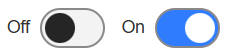
The Switch Element contains a toggle button with customisable ON and OFF values. When a Switch Element has been added to the form, at runtime, it will be displayed in the OFF position (both the ON and OFF positions are shown below).
- Different ON/OFF images can be displayed within the handle component of the button, and the button can be configured to use different colours. In addition, alternative wording can be used for the ON and OFF labels, and the labels (along with any associated descriptive text) can be removed. See the Properties section, below, for more information.

Once you have placed a Switch Element on a page, you can edit the Element's properties to configure the Element for your requirements. Select the Element on the page to display its properties in the Properties Pane.
The following properties are available:
Element Version
The Element's version number, which may be (and is often) different to the installed version of the Digitise Forms software. For example, the version of the Element might be 1.5, but the version of the in-use/installed Digitise Forms software might be 2.0 etc.
Label
Allows you to change the text displayed in the label for this Element. You can change the default label to provide a more meaningful description or option for your users.
Description
Lets you add a description explaining (for example) what the switch does, to be displayed beneath the Element label at form runtime. See the Show Description property, below, for more information.

Visible and Disabled Properties
Show Description
Lets you show or hide the Element's description (to be displayed beneath the Element label) at form runtime. To hide the description, deselect this option.
Alignment
Allows you to specify the position/alignment of the Switch Element. The options available are Left or Right.
On Icon
Lets you choose an icon to be displayed within the switch handle when the switch is in the ON position.
Off Icon
Lets you choose an icon to be displayed within the switch handle when the switch is in the OFF position.

Value
Contains the value of the Switch Element.


Data Category
On Value
Lets you assign an ON value for the Switch Element (e.g., True, Yes, etc.).
Off Value
Lets you assign an OFF value for the Switch Element (e.g., False, No, etc.).
State Category
On Label
Lets you add wording that will be displayed in the State label (next to the switch) when it is in the ON position.
Off Label
Lets you add wording that will be displayed in the State label (next to the switch) when it is in the OFF position.
Show State
Lets you show or hide the State label.
Styles Category
Label, Description, and State Label
Allow you to assign a style to the Element's label and description, and to its State label.
Track Off Colour, Track On Colour, Handle Off Colour, and Handle On Colour
Allow you to assign a different colour to each of the switch components.