access PaySuite Elements
The access PaySuite Elements allow you to provide payment facilities within your form via the access PaySuite payment service. To use these Elements, you will need to be signed up to the access PaySuite payment service and enter your access PaySuite credentials in Form Manager. These values are stored encrypted in the Digitise Forms Configuration Database so that they are available to the Forms Server when a user requests to make a payment but are not accessible within the form's HTML. Note that you will need to publish your form before you can enter your access PaySuite credentials in the Form Manager.
Once you have placed an access PaySuite Element on a page, you will need to configure the Element by editing its properties. Select an Element on a page to display its properties in the Properties Pane.
There are three separate Elements:

Allows you to provide a list of items or services which can be purchased or paid for within the form.
A Cart Item Element can display one item or service together with its price. So you need to add one of these Elements to the form for each item or service you want to make available for purchase. The Element includes a configurable 'Add' button which the user clicks or taps to add the item or service to their shopping cart. Once the user has added all the items or services they want to purchase to the cart, they can then make payment from within the Cart Element.
Once you have placed a Cart Item Element on a page, you can edit the Element's properties to configure the Element for your requirements. Select the Element on the page to display its properties in the Properties Pane.
Element Version
The Element's version number, which may be (and is often) different to the installed version of the Digitise Forms software. For example, the version of the Element might be 1.5, but the version of the in-use/installed Digitise Forms software might be 2.0 etc.
Label
Specifies the text to be displayed on the button used to add this item to the shopping cart.

Visible and Disabled Properties
Description (Required)
Specifies a description of the item or service. This property must be supplied. Maximum 100 characters.
Amount (Required)
Specifies the cost of the item or service in pounds. This property must be supplied. Enter the amount without a '£' symbol.
Reference
Specifies an optional reference number or string for the item or service. If you include a reference, it will be displayed in the Element. Maximum 50 characters.
Fund Code
Allows you to specify a fund code, if required. Optional. Maximum 5 characters.
Line ID (Required)
Specifies a line ID for the item or service. This property must be supplied. Maximum 50 characters.
Provides a list of the items or services which the user has selected from the Cart Item Elements and displays the total value of the items or services listed. The user can review the list and delete any unwanted items or services before making payment.
To delete an item from the list, click or tap the  button, displayed at the end of each row in the list.
The Element includes a Pay button, which the user clicks or taps when they are ready to make the payment. This button redirects the user to the access PaySuite service and the user can enter their payment details. When finished, the user automatically returns to the form.
You can create special pages within your form to notify the user whether their payment was successful or not and then, using the Element's properties, instruct the form to display the appropriate one depending upon the result returned from the access PaySuite service. The properties also provide Events related to whether the payment was successful or not, allowing you to perform custom actions when the user is returned to the form from the access PaySuite service.
If there are any problems connecting to the access PaySuite service, an error message will be displayed at the bottom of the Cart Element.
At the same time as making payment, you can optionally submit the form in the same way as using the Submit Button, i.e. the values in all output mapped Elements will be written to the appropriate Datasource(s), any files specified in a File Upload Element will be uploaded and a PDF copy of the form will be created, if the PDF creation feature is selected when you publish the form.
You can only have one Cart Element per form.
Once you have placed a Cart Element on a page, you can edit the Element's properties to configure the Element for your requirements. Select the Element on the page to display its properties in the Properties Pane.
Element Version
The Element's version number, which may be (and is often) different to the installed version of the Digitise Forms software. For example, the version of the Element might be 1.5, but the version of the in-use/installed Digitise Forms software might be 2.0 etc.
Label - specifies a text string of your choice to be displayed at the top of the Cart.
Visible and Disabled Properties
Description (Required)
Provides a description for the Cart. It is not displayed anywhere on your form but is required by the access PaySuite service. Maximum 100 characters.

Required
Allows you to specify whether payment must be made before the user can move to the next page.
- If you use this property to enforce payment, you cannot submit the form at the same time. You will need to deselect the Submit Form option on the Advanced tab,
 , and add a separate Submit Button Element to the form instead.
By default, the  box is selected which means that the user won't be able to continue through the form until they have selected and successfully paid for one or more items or services.
If you want to allow users to move to the next page, irrespective of whether they have bought any items or services, select the  box instead.
Alternatively, you can click on the  box to enter a JavaScript expression which will determine whether moving to the next page is conditional upon payment or not. The expression will be evaluated at runtime and if it evaluates to true the user won't be able to move to the next page unless they have made a successful payment; if it evaluates to false, moving to the next page will not be conditional upon payment. Clicking on the box will load the Expression Builder pop-up which allows you to type in your expression:
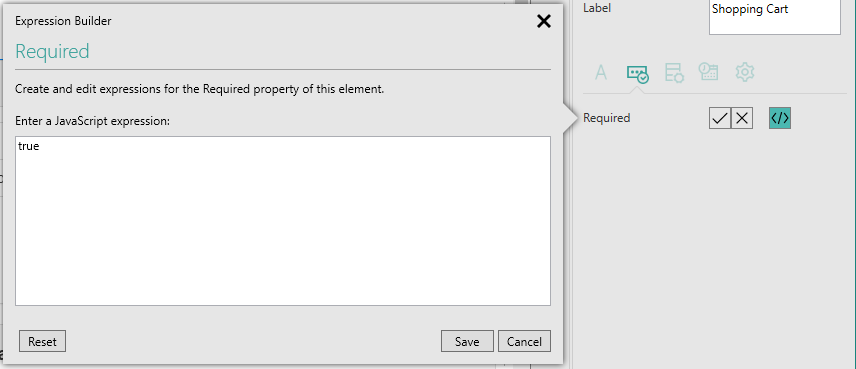
Click on the Save button to save your changes or on Cancel to abandon any changes. The Reset button will clear the current expression and reset this property back to its default value.
-
When using quotation marks within the Expression builder, you must use single quotes only.
When the expression is set to simply true or false by selecting one of the True and False boxes
 , this is a special case and the true and false values do not have quotation marks.
true and false should be spelled in lower-case.

Cart Items
Allows you to output map the list of items in the Cart so that when the form is submitted, a record of the contents of the Cart will be output to the Datasource specified here. This Element can only be output mapped, you cannot specify an input mapping.
Transaction Result
Allows you to store a record of the payment transaction results by specifying an output mapping for this information. The last transaction result is entered into this property and, if an output mapping is specified, when the form is submitted the current value in the property will be written to the specified Datasource.
For more information on data mappings refer to the
This Element doesn't work with Imported Stored Procedures which return a Result Set.

The Events properties allow you to customise what happens when a payment transaction returns to the form after being redirected to the access PaySuite service.
Clicked
The Clicked Event allows you to add custom actions which will be performed when the 'Pay' button is clicked or tapped.
Success
The Success Event allows you to add custom actions if the payment was successful and, if the Element is configured to submit the form when making payment (see Submit Form property on the Advanced tab, ), the submission was successful too.
Payment Failure
The Payment Failure Event allows you to add custom actions if the payment was NOT successful. This Event will be triggered irrespective of whether the form was submitted (see Submit Form property on the Advanced tab, ), and, if so, whether the submission was successful or not.
Submit Failure
The Submit Failure Event allows you to add custom actions if the payment was successful but an attempt to submit the form (see Submit Form property on the Advanced tab, ) failed.
For more information about Events and assigning actions to them refer the
Behaviour Category
Success Page
Defines a page to move to after returning from the access PaySuite service if the payment was successful and, if the Element is configured to submit the form when making payment (see Submit Form property below), the submission was successful too.
Payment Failure Page
Defines a page to move to after returning from the access PaySuite service if the payment was NOT successful. This page will be displayed irrespective of whether the form was submitted (see Submit Form property below), and, if so, whether the submission was successful or not.
Submit Failure Page
Defines a page to move to after returning from the access PaySuite service if the payment was successful but an attempt to submit the form (see Submit Form property below) failed.
Submit Form
If this option is selected, when a user is redirected to the access PaySuite service, the form will also be submitted, as if a Submit Button Element had been activated. When the form is submitted, the values in all output mapped Elements will be written to the appropriate Datasource(s). If this option is not selected, payment requests will not submit the form and you will need to include a separate Submit Button on your form if you want to collect the information entered onto the form.
If you select this option and you later turn on PDF generation within the publishing profile for the form, when the form is submitted a PDF file copy of the form will also be created.
If you use the Required property (see Rules tab, ) to validate payment before allowing the user to continue with the form, you cannot submit the form at the same time. You will need to deselect the Submit Form option and add a separate Submit Button Element to the form instead.
This option is not relevant to the use of Imported Stored Procedures where the Stored Procedure returns a Result Set, and won't submit data which is handled by an Imported Stored Procedure.
For Stored Procedures which only include inserts or updates, and don't return a Result Set, you can submit data via the Imported Stored Procedure but you will need to provide the Primary Key value(s), Digitise Forms will not supply these as it does for Imported and Digitise Forms Datasources.
Reset Form on Submit
Determines whether the form should be reset back to its initial values after submitting the form as part of the payment process. This option only takes effect if the Submit Form option above is selected. If both Submit Form and Reset Form on Submit are selected, the form will be reset after submission. Otherwise, the Elements on the form will retain their values after the submission.
Display Error
Determines whether errors which occur when submitting the form as part of the payment process will be displayed in a pop-up message box. This option only takes effect if the Submit Form option above is selected. If both Submit Form and Display Error are selected, a pop-up message box will be used to display any errors which occur when submitting the form. The messages displayed in this message box may provide more information than the error messages displayed within the Cart and will require the user to dismiss the message. If Display Error is not selected, only the errors displayed at the bottom of the Cart will be available and the pop-up messages will not be displayed.
Styles Category
Label, Body, Item List and Error Message
These properties allow you to assign a style to the heading, body, items and the invalid data error message text, respectively, e.g. to set the font type, size and colour.
Submit Button Label Style
Allows you to assign a style to the Pay Button's Label, e.g. to set the font type, size and colour.
Submit Button Style
Allows you to assign a style to the body of the Pay Button, e.g. to set the background colour.
If you have upgraded a project created using a version of Digitise Forms earlier than Digitise Forms - 2021 Spring Update, this property will only appear if you have also upgraded the Elements within the project, in which case this property will automatically be set to the same value as the Submit Button Label Style property above.
This Element shows the result of the last payment attempt, by displaying the last message returned from the access PaySuite service. If the payment is successful, it will include a payment summary, including the unique transaction reference ID.
Note, however, that it will only display messages returned after a successful redirection to the access PaySuite service. If there is a problem connecting to the service, this will be indicated by an error message displayed in the Cart Element.
This Element is optional and, unlike the other access PaySuite Elements, isn't required on a form to use the access PaySuite payment service.
Element Version
The Element's version number, which may be (and is often) different to the installed version of the Digitise Forms software. For example, the version of the Element might be 1.5, but the version of the in-use/installed Digitise Forms software might be 2.0 etc.
Visible and Disabled Properties
Success Text
Allows you to specify a text string of your choice to be displayed when a payment succeeds. This text will be displayed within the body of the Element.
Failure Text
Allows you to specify a text string of your choice to be displayed when a payment fails. This text will be displayed within the body of the Element.
See also: