 Install
This section of the Digitise Forms Online Help provides step-by-step instructions for completing the installation process for NDL Digitise Forms, and covers everything from the minimum requirements through to software security.
By following the instructions provided in the separate Install topics contained within this section, you will be able to set up your NDL Digitise Forms so that Electronic Forms ('eForms') can be created and successfully deployed.
It is important to bear in mind that the information contained within this section of the Online Help doesn’t constitute specific security advice, and that the details provided within the Install topics should be shared with the individuals and teams within your organisation that are likely to want to install and use NDL Digitise Forms. The Install topics offer a recommendation for Digitise Forms ‘best practice’, which, if followed, will allow the required Services to operate in the required manner. Specific security configurations and instructions for running the software within your own environment should be obtained from your systems administrator and should be adhered to at all times. Failure to follow the installation steps provided, or failure to adhere to the recommended security guidelines, could jeopardise the installation of NDL Digitise Forms.
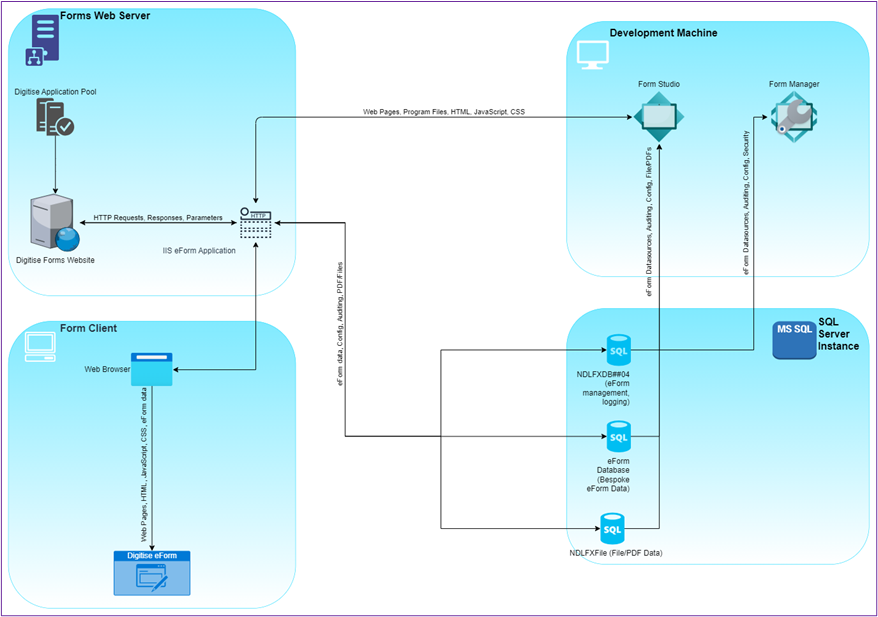
The following diagram shows the Digitise Forms Infrastructure topology:
To access the Install topics, click on the links beneath the main Install menu item at the top of the page, or click on the Install topic links in the upper, right-hand corner of the page.